Grimoire
Grimoire
Building a songwriting app with AI
Building a songwriting app with AI
Building a songwriting app with AI
Role
Role
Product Designer
Product Designer
Timeline
Timeline
Aug 2025 - Dec 2025
Aug 2025 - Dec 2025
Skills
Skills
Product Design
User Research
Product Design
User Research
Overview
Overview
Designed in Figma and built with Cursor and Xcode, Grimoire is an iOS songwriting app that allows users to attach audio files to a notepad, loop specific sections of music, and organize songs into folders. The product is designed to reduce creative friction by keeping listening, writing, and iteration in a single, focused workflow that supports sustained creative flow.
Designed in Figma and built with Cursor and Xcode, Grimoire is an iOS songwriting app that allows users to attach audio files to a notepad, loop specific sections of music, and organize songs into folders. The product is designed to reduce creative friction by keeping listening, writing, and iteration in a single, focused workflow that supports sustained creative flow.
Problem
Problem
When songwriting, many digital tools introduce distractions that interrupt creative focus. While many iOS users rely on the native Notes app for writing, it lacks essential audio features needed to effectively write alongside music.
When songwriting, many digital tools introduce distractions that interrupt creative focus. While many iOS users rely on the native Notes app for writing, it lacks essential audio features needed to effectively write alongside music.
Research & Discovery
Research & Discovery
To validate the opportunity, I conducted interviews with musicians and songwriters ranging from bedroom producers to professional artists. Key insights included:
To validate the opportunity, I conducted interviews with musicians and songwriters ranging from bedroom producers to professional artists. Key insights included:

"I mainly use the native iPhone notepad because you can play music in it."
“I mainly use the native iPhone notepad because you can play music in it.”

"The notepad app has an audio player but it doesn't have a looping feature to make writing hooks easier."
“The notepad app has an audio player but it doesn’t have a looping feature to make writing hooks easier.”

"Having a digital version of my song lyrics makes it easier to upload them to website like Genius."
“Having a digital version of my song lyrics makes it easier to upload them to website like Genius.”
Key Features
Key Features
🎼 Audio + Notepad
Users can attach local and cloud based audio files and playback their music while writing lyrics.
🔁 Looping Engine
Implemented custom loop points users can drag and reset, supporting precise section focus.
🗂 Folder System
Inspired by file managers, users can create folders, move songs, and collapse lists for clean navigation.
🎼 Audio + Notepad
Users can attach local and cloud based audio files and playback their music while writing lyrics.
🔁 Looping Engine
Implemented custom loop points users can drag and reset, supporting precise section focus.
🗂 Folder System
Inspired by file managers, users can create folders, move songs, and collapse lists for clean navigation.
Adding a Song
Adding a Song
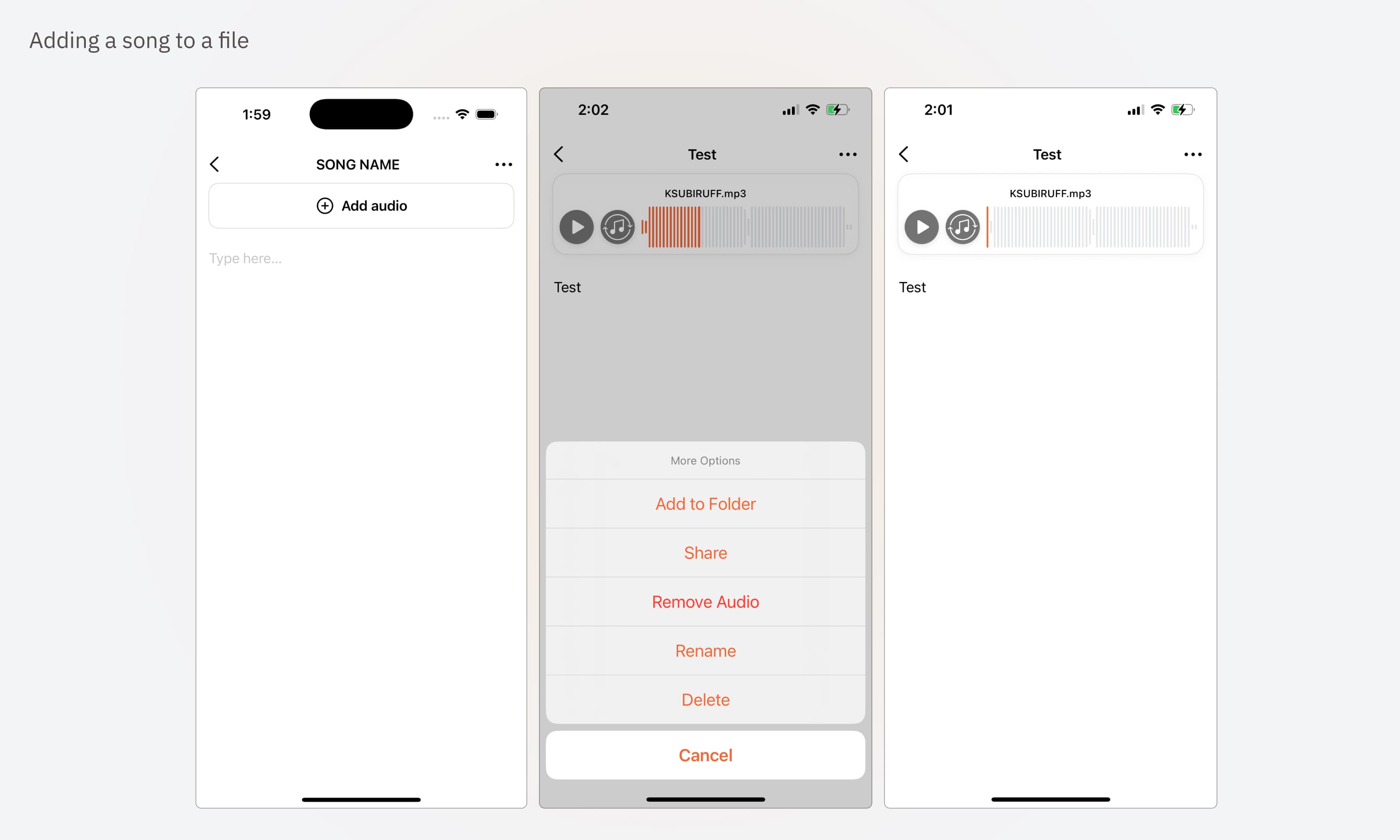
The core decision was keeping audio and lyrics on one screen. Songwriters work by replaying a section and adjusting words, so I anchored the track as a waveform player above the lyrics, with press-and-drag scrubbing. Adding audio is one button on an empty song, and file management moves to an overflow menu to keep the writing space quiet.
The core decision was keeping audio and lyrics on one screen. Songwriters work by replaying a section and adjusting words, so I anchored the track as a waveform player above the lyrics, with press-and-drag scrubbing. Adding audio is one button on an empty song, and file management moves to an overflow menu to keep the writing space quiet.
Music Player
Music Player
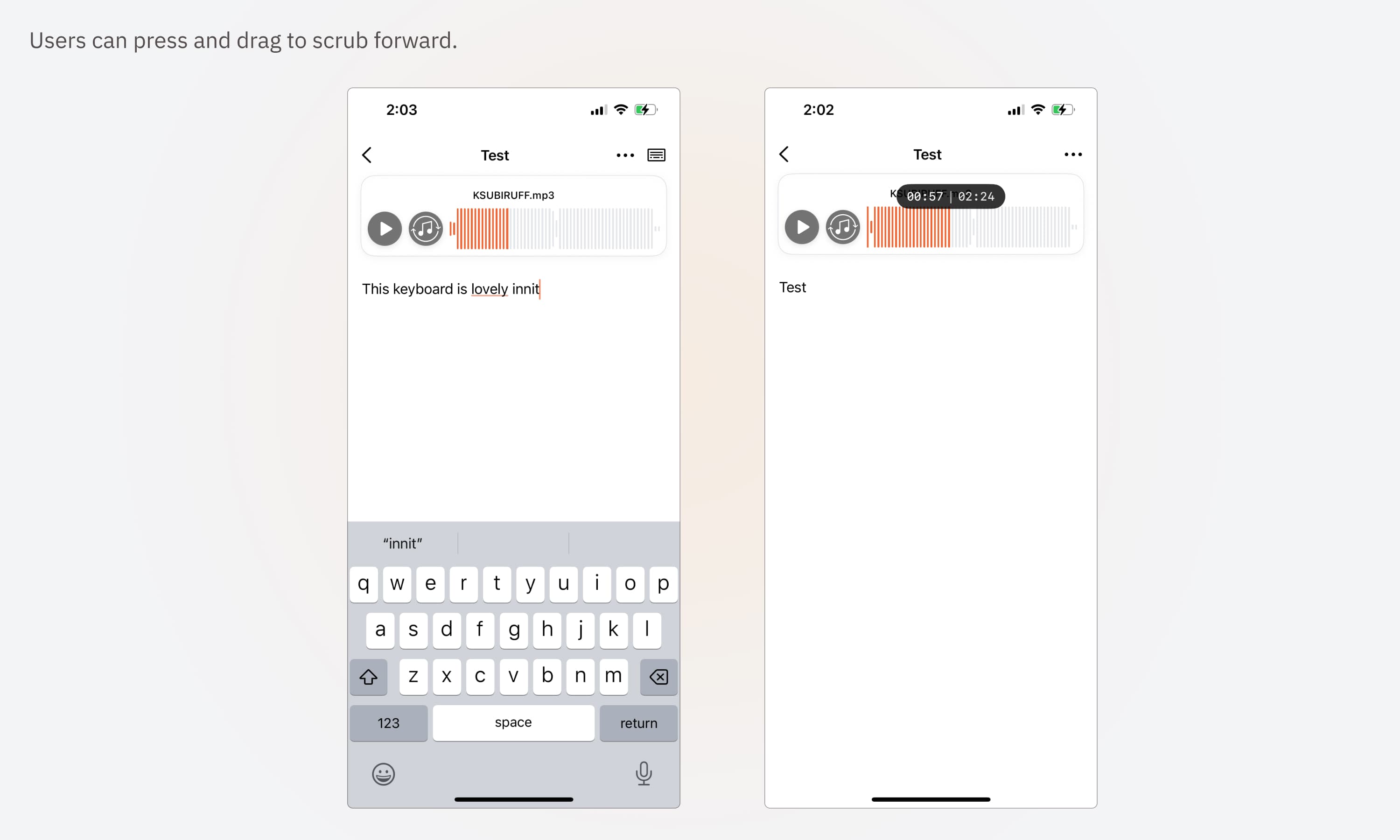
As a primary touchpoint of the app, the music player was designed to balance clarity and subtlety. Key interactions include a dedicated looping control for isolating song sections and haptic feedback during scrubbing to provide tactile confirmation and support precise playback adjustments.
As a primary touchpoint of the app, the music player was designed to balance clarity and subtlety. Key interactions include a dedicated looping control for isolating song sections and haptic feedback during scrubbing to provide tactile confirmation and support precise playback adjustments.

Looping in Action
Looping in Action
Maintaining visible timestamps while adjusting loop points was a top request from beta testers, ensuring precise control without losing temporal context. This reduced trial-and-error when refining loops and helped writers iterate more quickly within focused sections of a song.
Maintaining visible timestamps while adjusting loop points was a top request from beta testers, ensuring precise control without losing temporal context. This reduced trial-and-error when refining loops and helped writers iterate more quickly within focused sections of a song.
Building with AI
Building with AI
I built Grimoire with Cursor and Claude Code. Early on, AI suggested React as the base. I went native with SwiftUI instead. Scrubbing and looping had to feel tight, and the app needed iOS features like background playback, lock-screen controls and iCloud.
I kept the design by hand. Every screen started in Figma, and I made the layout calls myself, like anchoring the waveform above the lyrics.
In testing, a phone call or Siri could break a loop mid-play. I flagged it as a bug and fixed it so playback picks back up in the right place.
I built Grimoire with Cursor and Claude Code. Early on, AI suggested React as the base. I went native with SwiftUI instead. Scrubbing and looping had to feel tight, and the app needed iOS features like background playback, lock-screen controls and iCloud.
I kept the design by hand. Every screen started in Figma, and I made the layout calls myself, like anchoring the waveform above the lyrics.
In testing, a phone call or Siri could break a loop mid-play. I flagged it as a bug and fixed it so playback picks back up in the right place.